
Techcrunch blogs about GodTube, a video sharing website for christians. As any serious video sharing website, you can embed videos from GodTube:
Showing posts with label video. Show all posts
Showing posts with label video. Show all posts
Thursday, April 5, 2007

Wednesday, March 28, 2007
Embed DailyMotion videos in your website
DailyMotion - another great video sharing site. Embedding videos from DailyMotion is just as simple as YouTube. Underneath the video you'll find the "Embeddable Player" entry from which you can copy and then paste on your site the HTML code for that video.
And here's the embedded video:
You can customize too the width/height of the video.
<div><object width="425" height="335"><param name="movie" value="http://www.dailymotion.com/swf/7i1Ui4np0BFDmag0l"></param><param name="allowfullscreen" value="true"></param><embed src="http://www.dailymotion.com/swf/7i1Ui4np0BFDmag0l" type="application/x-shockwave-flash" width="425" height="335" allowfullscreen="true"></embed></object><br /><b><a href="http://www.dailymotion.com/video/x1gef9_burnweb">BURN_web</a></b><br /><i>Uploaded by <a href="http://www.dailymotion.com/rescuescg619">rescuescg619</a></i></div>
And here's the embedded video:
You can customize too the width/height of the video.
Embed videos from Metacafe
Looking to embed videos from Metacafe? Here's how: on the page of the video on Metacafe, look underneath the video for the "Blog/Embed player".
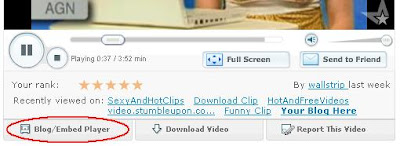
Here's how the code looks like:
And here's the embedded videos:
Talking Cats - Click here for this week’s top video clips
You can customize the width and height of the video. They even feature a nice option of having your blog name listed on the page of that videoclip. "By embedding this video, you can have your blog listed on this page. Click here to see how.Place this video in your website or blog. Works on: MySpace, Blogger, Xanga, Friendster and many more".

Here's how the code looks like:
<embed src="http://www.metacafe.com/fplayer/496348/amazing_dance.swf" width="400" height="345" wmode="transparent" pluginspage="http://www.macromedia.com/go/getflashplayer" type="application/x-shockwave-flash"></embed><br><font size = 1><a href="http://www.metacafe.com/watch/496348/amazing_dance/">Amazing Dance</a> - <a href='http://www.metacafe.com/'>The best bloopers are here</a></font>
And here's the embedded videos:
Talking Cats - Click here for this week’s top video clips
You can customize the width and height of the video. They even feature a nice option of having your blog name listed on the page of that videoclip. "By embedding this video, you can have your blog listed on this page. Click here to see how.Place this video in your website or blog. Works on: MySpace, Blogger, Xanga, Friendster and many more".
Embedding videos in your blog - YouTube
Everyone knows how to embed YouTube videos in their website. We're taking a quick look today at how it's done.
Basically, for each video you found on YouTube for which you want to embed it in your blog or your website, look for the "Embed" entry in the right part of the video. There you'll find a string similar to
and this is how it looks in your website:
Note you can change the size of the video accordingly. Just replace the width and height attributes in the HTML code above. Here's a smaller version:
Basically, for each video you found on YouTube for which you want to embed it in your blog or your website, look for the "Embed" entry in the right part of the video. There you'll find a string similar to
<object width="425" height="350"><param name="movie" value="http://www.youtube.com/v/kkT7A3jegBc"></param><param name="wmode" value="transparent"></param><embed src="http://www.youtube.com/v/kkT7A3jegBc" type="application/x-shockwave-flash" wmode="transparent" width="425" height="350"></embed></object>
and this is how it looks in your website:
Note you can change the size of the video accordingly. Just replace the width and height attributes in the HTML code above. Here's a smaller version:
Subscribe to:
Posts (Atom)